Valentines Day PSD Layered Scene
If you're designing for Valentine’s Day — whether it’s a handcrafted greeting card, an Etsy shop banner, a blog header for a seasonal post, or social media visuals for a small business — time, realism, and flexibility matter. The Valentines Day PSD Layered Scene delivers all three in one well-structured, professionally crafted file. It’s not just another clipart bundle. It’s a thoughtfully assembled toolkit built for creators who need authentic, editable, high-fidelity assets — without starting from scratch.
What You’re Actually Getting (and Why It Saves Time)
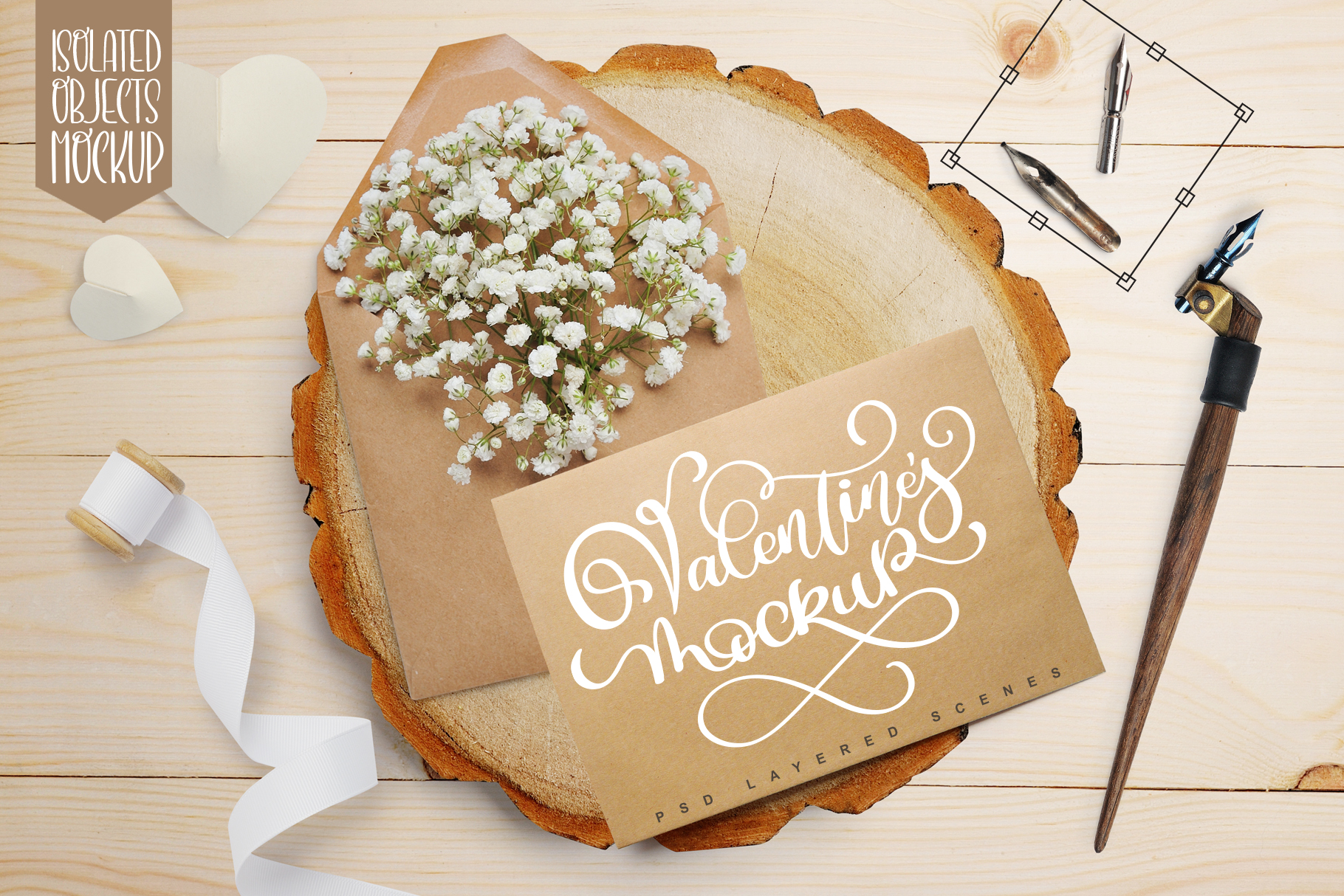
This pack includes one fully layered PSD file with four distinct backgrounds — soft linen, textured kraft paper, delicate marble, and warm neutral matte — each shot in studio conditions using professional lighting and high-resolution cameras. No pixelation. No muddy shadows. Just clean, consistent tonal foundations that hold up whether you’re printing on letterpress stock or scaling for Instagram Stories.
Beyond the backdrops, there are seven meticulously isolated items: a vintage-style heart locket, a folded love note, a ribbon-wrapped gift box, a single red rose, a wax-sealed envelope, a pair of interlocking rings, and a handwritten “Happy Valentine’s Day” phrase rendered in elegant calligraphy. Each item was cut by hand — not automated — preserving subtle edge variations and natural texture. Crucially, every shadow lives on its own layer, positioned realistically relative to light direction and surface plane. That means you can move, resize, or recolor any element *without* breaking visual coherence.
Real Flexibility, Not Just “Editable”
The kraft mock-up sheet is embedded as a vector smart object — so you can adjust its color instantly, apply seamless patterns, overlay watermarks, or even insert your own logo or typography without raster degradation. Need to match your brand’s exact Pantone? Adjust the hue in seconds. Preparing a set of holiday tags for a craft fair? Swap in your custom foil stamp design onto the gift box layer — and keep the drop shadow intact.
Because everything is layered and non-destructive, you’re not limited to preset compositions. Want the rose in front of the envelope instead of behind? Drag the layer. Prefer the calligraphic phrase centered on marble rather than kraft? One click to hide the background you’re not using. This isn’t about choosing from templates — it’s about building your own scene, with full control over depth, hierarchy, and mood.
Who Benefits Most — And How
Handmade sellers on Etsy or Shopify use this to stage product photos without a studio. Place your handmade soap beside the wax-sealed envelope on kraft paper, add your label on the gift box, and export a cohesive, branded lifestyle image — all in under 15 minutes.
Bloggers and content creators find it especially useful for seasonal roundups. Instead of licensing generic stock photos, they build custom headers for posts like “10 Romantic DIY Gifts” or “Valentine’s Marketing Tips for Small Businesses” — reinforcing voice and authority with original, on-brand visuals.
Freelance designers and marketers appreciate how quickly they can pivot between formats. A single composition adapts seamlessly to Pinterest pins (vertical), Instagram carousels (square), email headers (wide), and printable PDFs — because layers scale cleanly and shadows remain anchored.
Educators and scrapbookers rely on the precision of manual cutouts. Unlike AI-generated masks that blur edges or flatten texture, these elements retain tactile nuance — critical when designing printable classroom valentines or layered digital scrapbook pages where authenticity supports emotional resonance.
Practical Use Requires Minimal Setup
This Valentines Day PSD Layered Scene works best in Adobe Photoshop CS4 or newer. No plugins, no extensions — just native layer support. If you’re comfortable renaming layers, toggling visibility, and adjusting blend modes, you already have the skills needed. There’s no learning curve hidden in complex actions or scripts. Everything is visible, labeled, and logically grouped.
That said, it’s not designed for beginners unfamiliar with Photoshop fundamentals — like layer masks or smart object editing. If you primarily use Canva or Figma, this won’t integrate natively. It’s purpose-built for users who value pixel-level control and output fidelity over drag-and-drop convenience. For those who do, it eliminates hours of sourcing, masking, lighting correction, and shadow recreation.
Where It Fits — And Where It Doesn’t
This asset shines when you need photorealistic, print-ready scenes rooted in tangible craft aesthetics — think kraft paper textures, soft linen folds, and delicate rose petals. It’s less suited for bold, graphic-heavy campaigns leaning into neon, gradients, or abstract illustration styles. Similarly, while the calligraphic phrase adds elegance, it’s not a font file — so if you need scalable text variations beyond that single phrase, you’ll pair it with your own type library.
Also worth noting: the pack includes only one PSD file — no alternate formats like PNG bundles or Illustrator vectors. That keeps the file size lean and the focus sharp. But if your workflow depends on multi-format access across tools, you may want to supplement with complementary assets.
Small Details That Add Up
Each item includes subtle imperfections — a slight curl on the love note’s corner, faint paper fibers on the kraft background, soft focus on distant rose petals — because real objects aren’t perfectly uniform. These details help your final designs feel grounded, not sterile. They also reduce the need for additional texture overlays or noise filters.
And because all photography was done with consistent white balance and lighting, color grading stays predictable. Adjusting warmth or contrast across the entire scene maintains harmony — no jarring mismatches between foreground and background tones.
A Tool That Grows With Your Projects
You might start with a simple Instagram post: kraft background + gift box + your logo on the ribbon. Next week, reuse the same rose and envelope layers in a wedding invitation suite — just change the background to marble and swap the calligraphy for your couple’s names. The next season, repurpose the locket and rings for an anniversary campaign. Because the elements are modular and resolution-independent, the Valentines Day PSD Layered Scene becomes part of your long-term creative infrastructure — not a one-off download.
It won’t replace strategy or storytelling. But when those things are clear, it removes friction between idea and execution — letting you focus on what matters most: connecting with your audience, honoring your craft, and sharing something meaningful — in time for February 14th.