Design Tool Kit: Your All-in-One Resource for Creative Projects
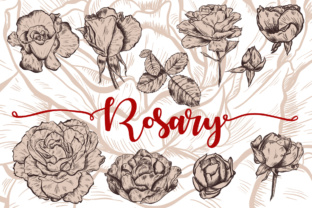
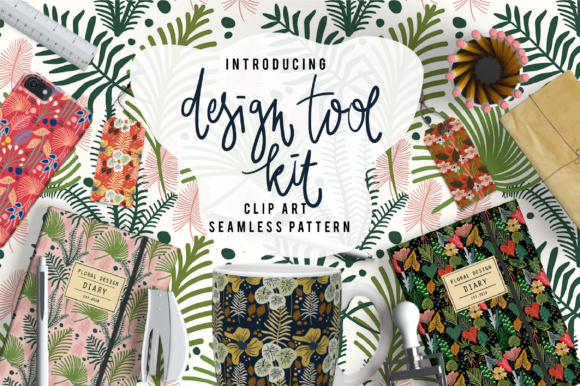
If you're a designer, craft enthusiast, small business owner, or DIY creator looking to bring elegance and consistency to your work—without spending hours sourcing or creating assets—you’ll appreciate how Design Tool Kit simplifies the entire creative process. This isn’t just another clip art bundle. It’s a thoughtfully curated, production-ready collection built for real-world use: 50 meticulously crafted leaf and flower clip art pieces, plus 29 versatile seamless patterns—all delivered in professional-grade formats.
Many creators face familiar roadblocks: inconsistent visual branding across products, time lost resizing or editing low-resolution graphics, or the frustration of finding patterns that tile smoothly without visible seams. Others struggle to maintain botanical sophistication across diverse applications—from fabric prints to digital wallpapers or product labels. That’s where Design Tool Kit steps in—not as a shortcut, but as a reliable foundation that supports intentionality, quality, and speed.
What Exactly Is Design Tool Kit?
Design Tool Kit is a cohesive design resource package centered on organic, nature-inspired aesthetics. It includes:
- 50 botanical clip art elements — hand-drawn leaves and flowers, delivered in both EPS 10 (vector, fully editable and infinitely scalable) and PNG at 300 DPI (crisp, transparent-background raster files ideal for quick placement);
- 29 seamless pattern masters in EPS 10 — vector-based, tileable designs perfect for scaling to any size without loss of fidelity—ideal for textiles, packaging, or large-format prints;
- 29 matching seamless patterns in JPG — high-resolution (300 DPI), ready-to-use raster versions for immediate integration into web projects, mockups, or platforms with limited vector support.
Every asset is designed with versatility in mind: clean lines, balanced negative space, and harmonious color-ready outlines—making them easy to recolor, layer, or combine without visual clutter.
Solving Real Creative Challenges
Consider these common scenarios—and how Design Tool Kit helps resolve them:
Small-batch product designers often need cohesive, nature-themed visuals for tote bags, mugs, or greeting cards—but lack time to commission custom illustrations or risk copyright issues with generic stock. With Design Tool Kit, they gain commercial-use-ready botanical motifs that feel bespoke, not templated.
Interior designers and home decor brands frequently source wallpaper or textile patterns that either lack botanical authenticity or require costly licensing. The 29 seamless patterns offer subtle variation—some delicate and airy, others dense and rhythmic—so users can match mood and scale to room size, fabric weight, or brand voice.
Educators and workshop facilitators building hands-on design activities benefit from the clarity and scalability of the EPS files. Students can learn vector manipulation using real-world assets—rotating leaves, adjusting stroke weights, or building new composites—without wrestling with pixelation or licensing ambiguity.
Practical Applications You Can Start Today
The strength of Design Tool Kit lies in its adaptability across mediums and skill levels. Here’s how different users put it to work:
- Create branded merchandise: Layer a single leaf clip art over a monochrome t-shirt mockup—or scatter three floral elements along a seam line for understated elegance on a canvas tote.
- Design custom stationery: Use a seamless pattern as a subtle background for thank-you cards, then overlay a clean white flower clip art as a focal point—no alignment headaches, thanks to precise vector anchors.
- Build digital assets: Drop a JPG pattern into Canva or Figma as a website section background; pair it with a PNG leaf as an animated hover icon—both retain crispness at any screen resolution.
- Develop surface pattern collections: Import EPS patterns into Adobe Illustrator, recolor using global swatches, and generate variations (light/dark mode, seasonal palettes) in minutes—not days.
- Produce print-ready packaging: Scale vector leaves to fit a tea box lid without quality loss, then repeat a complementary pattern along the side panel—ensuring continuity from front to back.
Because all files are delivered in industry-standard formats, there’s no need for conversion tools or compatibility workarounds. Whether you’re using Affinity Designer, CorelDRAW, Procreate (with PNG imports), or even Cricut Design Space (via SVG conversion from EPS), the assets integrate smoothly.
Getting the Most From Your Design Tool Kit
To maximize value, consider these practical tips:
- Start with your end use. Need large-scale wallpaper? Prioritize the EPS patterns—they’ll hold up flawlessly when scaled to 8 feet wide. Building social media banners? The PNG clip art offers fast drag-and-drop flexibility.
- Experiment with layering. Try placing a light-colored leaf over a dark-patterned background, then reduce opacity slightly for depth. Or invert the approach—dark leaf on light pattern—for contrast and readability.
- Leverage transparency. All PNGs include alpha channels, so you can drop them directly onto photos, gradients, or textured backgrounds without white boxes or manual erasing.
- Think beyond “botanical.” These aren’t just for garden themes. Simplified leaf forms work beautifully in wellness branding; structured floral silhouettes add quiet luxury to minimalist packaging; geometric-leaning patterns suit modern apparel lines.
And remember: while Design Tool Kit provides exceptional starting points, its true power emerges when paired with your unique voice. Recolor a pattern to match your brand’s tertiary palette. Combine two clip art elements to invent a new hybrid motif. Mirror and rotate a leaf to build a custom border. The toolkit empowers—not replaces—your creative judgment.
Who Benefits Most—and Why
This isn’t a one-size-fits-all solution, but rather a precision instrument suited to specific needs:
- Beginners appreciate the plug-and-play usability of PNGs and JPGs—no vector software required—and the intuitive botanical theme that reads clearly across contexts.
- Experienced designers value the EPS 10 vector integrity: editable anchor points, live text compatibility, and CMYK-ready outlines for professional print workflows.
- Entrepreneurs launching physical products gain peace of mind knowing every file is licensed for commercial use—including resale on items like mugs, apparel, and wall art—no hidden restrictions or attribution requirements.
- Teams maintaining brand consistency use the unified aesthetic language across marketing collateral, packaging, and digital touchpoints—reducing visual fragmentation and reinforcing recognition.
In short, Design Tool Kit bridges the gap between inspiration and execution. It removes friction—not creativity. It saves time—not vision. And it delivers beauty that feels intentional, not incidental.
Whether you’re sketching your first product label or refining a full seasonal collection, having 50 expressive botanical elements and 29 refined patterns at your fingertips changes what’s possible—and how quickly you get there.